
Download B7Labs – AI‑Powered Reading Companion, Summarize, Chat & Share
Overview
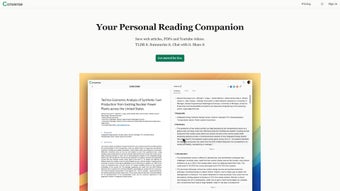
B7Labs introduces Converse, an AI‑driven reading companion that reshapes the way users interact with web articles, PDF files, and YouTube videos. Built on advanced natural‑language processing, Converse lets you capture any online content, generate concise TLDR summaries, and extract the most valuable insights with a single click. The standout feature is its document chat – a conversational interface where you can ask the saved material direct questions and receive precise answers, each anchored to the original source.
Beyond summarization, Converse automatically organizes your saved items into permanent libraries, making it simple to retrieve information whenever you need it. Social sharing is baked in, allowing you to distribute your curated collections with friends or professional networks, who can then engage with the content in the same interactive way. Whether you’re a student racing against deadlines, a researcher juggling dozens of papers, or a casual reader looking to skim videos efficiently, Converse promises a faster, more engaging, and collaborative reading experience.
Feature Deep Dive
- AI‑Generated Summaries: Instantly produce TLDR‑style overviews for articles, PDFs, and videos, reducing reading time by up to 80%.
- Document Chat: Pose natural‑language questions to any saved content and receive exact answers with clickable source references.
- Permanent Libraries: Automatically group saved items into themed collections that persist across devices.
- Cross‑Media Support: Works with web pages, PDF documents, and YouTube videos, unifying all knowledge sources under one roof.
- Social Sharing & Collaboration: Share libraries or single items with a link; collaborators can ask their own questions and add notes.
- Contextual Highlighting: When an answer is returned, Converse highlights the exact paragraph or timestamp that contains the information.
- Secure Cloud Sync: All data is encrypted in transit and at rest, ensuring privacy while providing seamless sync across Windows, macOS, Android, and iOS.
- Regular Updates: The AI engine is continuously refined, delivering better summarization accuracy and faster response times.
- Offline Mode: Download libraries for offline access; summaries and chat functionality remain available without an internet connection.
- Customizable Appearance: Light and dark themes, adjustable font sizes, and layout options to suit personal reading preferences.
These capabilities are not just a collection of isolated tools; they work together to create a fluid workflow. For example, you can save a research article, generate a summary, ask a specific methodological question, and then instantly share the highlighted answer with a colleague—all without leaving the Converse interface. The AI models behind the scenes are trained on millions of documents, ensuring that the generated content is both concise and context‑aware. Moreover, the platform’s emphasis on source attribution means you never lose sight of where information originated, a critical factor for academic integrity and professional reporting.
Getting Started: Installation, Compatibility & Daily Use
Installation Process
Downloading B7Labs Converse is straightforward. Visit the official B7Labs website, click the “Download for Windows” or “Download for macOS” button, and the installer will begin automatically. For mobile devices, locate “B7Labs Converse” in the Apple App Store or Google Play Store. The installer guides you through standard steps: accept the license agreement, choose an installation folder, and click “Install.” Once completed, launch the app and create a free B7Labs account using an email address or single‑sign‑on via Google or Apple ID. After confirming your email, you’ll be greeted by a short onboarding tutorial that demonstrates how to save content, request a summary, and start a document chat.
System Requirements (itemprop="operatingSystem")
- Windows 10 or later (64‑bit)
- macOS 11 (Big Sur) or later
- Android 8.0 (Oreo) or later
- iOS 13 or later
The desktop version requires at least 4 GB of RAM and 200 MB of free disk space. Mobile installations need a minimum of 150 MB and a stable internet connection for the initial sync, after which offline mode can be enabled.
Daily Workflow
Once installed, using Converse becomes a habit‑forming routine. To save an article, simply click the B7Labs browser extension (available for Chrome, Edge, and Firefox) while browsing. The extension captures the URL, pulls the content into your library, and instantly offers a “Generate Summary” button. For PDFs, drag‑and‑drop the file into the app window or use the “Import PDF” option in the mobile menu. YouTube videos are added by pasting the video URL; Converse then extracts the transcript, creates a summary, and indexes timestamps for quick navigation.
After content is saved, the chat window appears on the right side of the screen. Type questions like “What are the main findings?” or “Explain the methodology in simple terms,” and the AI replies with a concise answer, a link to the exact paragraph or video segment, and an option to copy the response. You can also tag items, add personal notes, or move them between libraries for project‑specific organization. When a library is ready to share, click the “Share” icon, generate a shareable link, and control permissions (view‑only or collaborative). Recipients can open the link in any browser, view the content, and interact with the chat without needing a B7Labs account—though signing up unlocks full editing capabilities.
Pros, Cons, FAQ & Final Verdict
Pros
- Fast, AI‑driven summaries dramatically cut reading time.
- Document chat turns static content into an interactive knowledge base.
- Cross‑platform support ensures seamless experience on Windows, macOS, Android, and iOS.
- Robust privacy with end‑to‑end encryption and offline access.
- Social sharing encourages collaboration and knowledge dissemination.
Cons
- Free tier limits the number of saved items per month.
- AI summarization may occasionally miss nuanced details in highly technical papers.
- Initial content indexing can be slower on older hardware.
- Advanced customization (e.g., custom AI prompts) is only available in the premium plan.
Frequently Asked Questions
Can I use B7Labs Converse without an internet connection?
Yes. After you have synced your libraries, you can enable Offline Mode. Summaries and document‑chat answers that were previously generated remain accessible, though new content will require an internet connection.
How secure is my data on B7Labs?
All data is encrypted with TLS 1.3 during transfer and stored with AES‑256 encryption at rest. B7Labs adheres to GDPR and CCPA guidelines, and you can delete any library permanently from the settings menu.
Is there a limit to the length of a document that can be summarized?
The free tier supports up to 20 pages per PDF or 10 minutes of video transcript per request. Premium users enjoy higher limits, up to 100 pages or full‑length video transcripts.
Can I integrate Converse with other note‑taking apps?
Yes. B7Labs provides Zapier and native API connectors for Evernote, Notion, and OneNote, allowing you to push summaries or chat answers directly into your existing workflow.
What pricing plans are available?
B7Labs offers a free tier with basic summarization and limited library size. The Pro plan costs $9.99 /month (or $99 /year) and includes unlimited saves, premium AI models, advanced customization, and priority support.
Conclusion & Call to Action
In a world where information overload is the norm, B7Labs Converse stands out as a practical, AI‑enhanced companion that transforms passive reading into active learning. Its blend of instant summarization, conversational querying, and collaborative sharing addresses the core pain points of students, researchers, and knowledge workers alike. While the free version places reasonable limits, the premium tier unlocks a truly limitless research environment. If you spend hours sifting through articles, PDFs, or long‑form videos, downloading B7Labs today will shave minutes—or even hours—off your workflow. Click the download button below, create your free account, and experience the future of reading.



.png)



